


Add Token to Trust Wallet
Get a step-by-step guide to how to add a token in TrustWallet.
It is hard to overstate the advantages that cryptocurrency adoption receives with the help of mobile wallets. One such widely popular mob crypto wallets is the “Trust Wallet.” Adding a token in the Trust Wallet exposes your crypto project to a +25M audience. Besides, having a coin icon in the app establishes your asset as more credible and attractive. So, read below the definitive guide about how to add a token in the TrustWallet.
Apart from that, do not forget to include the coin logo in the Metamask wallet.
What’s Trust Wallet?
The Trust Wallet is one of the most popular decentralized wallets, like Metamask. It is capable of supporting the purchase, storage, and accumulation of NFTs and crypto. Users can also trade and earn cryptocurrencies in the app. Its biggest strength is that it gives full control over the funds. As such, any central authority cannot hold any user funds since all is in the blockchain.
Advantages
Getting a token logo visible in Trust Wallet gives your crypto venture many advantages. The most critical among them are:
- Acquiring visibility among the +25 million people using Trust_Wallet.
- Decreasing the likelihood that fake coins try to mimic your altcoin.
- Expansion in reliability and trust.
- Making the asset more attractive to buyers and holders through Trust Wallet tools.
Requirements
Make sure your coin is compatible with Trust Wallet before applying.
First, your token must have 10,000 holders and 15,000 transactions. NOTE: TrustWallet does not include airdrop tokens. So, for example, your application would be rejected if your account has 9000 holding wallets with one coin in each.
Secondly, a project must have a website with a white paper, a clear roadmap, and tokenomics.
Aside from that, you should also maintain a functional telegram group and at least two social media handles (FB, Twitter, Reddit, etc.) with real followers and without bots.
Make all texts, images, and logos that appear on your website your own. Do not reproduce content from any website.
A token should exhibit price movement in CoinMarketCap and Coingecko. List your token in an exchange in order for it to be listed in CMC & CG.
In addition, a coin must be accompanied by a token audit from a reputable organization.
However, the team has the right to reject your application for whatever reason. Developers do not publish fake and useless projects.
Prepare information
Also, prepare specific information about your coin before the application submission. Below is an example of a set of information for filling out a Github request for listing an asset in Trust Wallet:
Token Name: YOUR TOKEN
Protocol: BEP20
Token Symbol: TOKEN
Decimals: 9
Description: What is your project about,write here
Website: https://yourwebsite.com
Explorer: https://bscscan.com/token/yourtokenaddress.
Links: all social media ULRs and coin-trackers links (CMC and CG).
All titles that can be accessed are listed in step #4 below.
Contract Address: Your contract address.
Logo: A token logo must be transparent and in the format of 256×256 pixels in png. Also, name a file for a logo as logo.png.
Charge processing
Besides that, there is a non-refundable processing fee that you must pay. TrustWallet would ask that you pay 500 TWT (BEP20) or 2.5 BNB. The maintainer (from TrustWallet team) would give the payment address and memo in the GitHub thread. Example.
Note that the processing fee is subject to revision according to overall crypto market conditions. It was, for example, 750 TWT in 2022 but was revised in late 2024 to 500 TWT.
Blockchains
You can now add altcoins that work with Binance Smart Chain (BEP20), Ethereum (ERC20), Binance (BEP2), and Tron
Steps
Follow these steps in order to add a token to the Trust Wallet. We will use an easier way without needing to make hard manipulations with GitHub
Step 1: GitHub Sign in
Log in, or register with GitHub. Confirm the account if you just created it.
Step 2: Launch the desktop application
Go to that page at https://assets.trustwallet.com/, log in with your GitHub account, and press the “Add Token.”
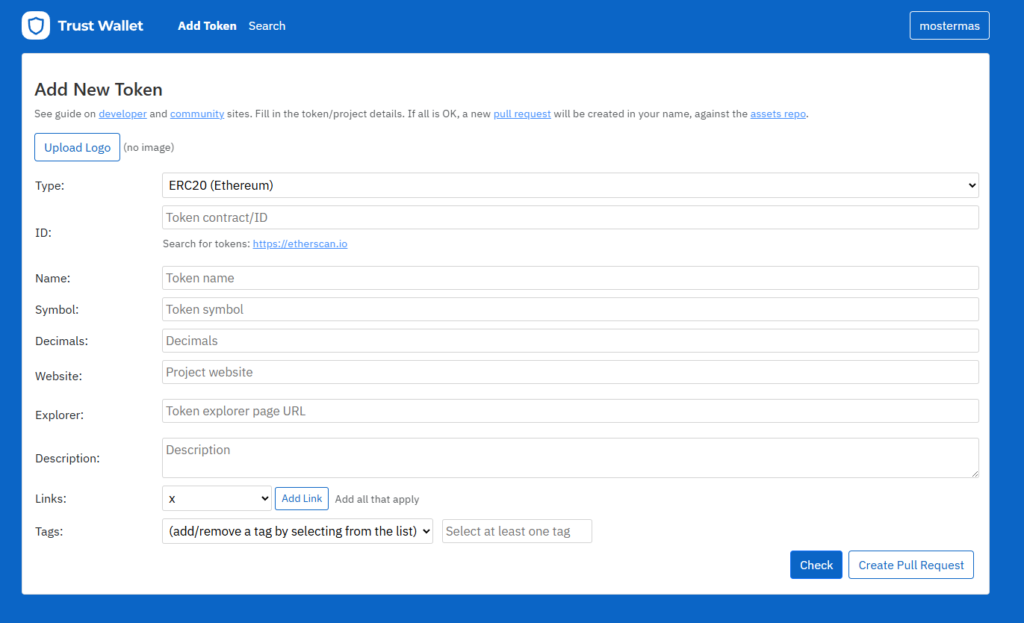
Pull Request creation
Rapid way for making a Pull Request.
Step 3: Fill in the form
Enter all your token information in the form. Then, click the «Create Pull Request» button.
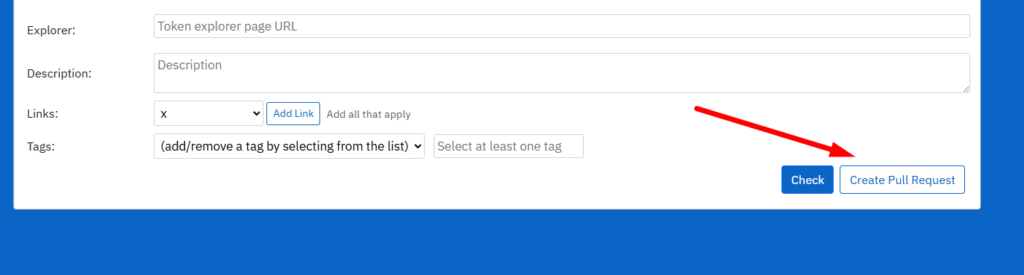
Quick method for sending a pull request
Fill the form to make a Pull Request.
Next, copy the link for the pull request and click it. Example: https://github.com/trustwallet/assets/pull/22512
Step 4: Payment and Negotiations
You will be shown the thread of the conversation and payment instructions in the subsequent screen. Then pay according to the instructions and wait for a response from a maintainer in the GitHub thread. This actual example of a pull request can be useful for you as well.
Get address and memo for payment of the fee.
Copy address and remittance advice for payment of fee:
Pay TWT BEP2 to TrustWallet:
Payment of BEP2 TWT to Trust Wallet Update: August 2024. With the latest TrustWallet update, now it is possible to pay in TWT (BEP20). Read a message in your pool request in order to find out the wallet address that you should pay. Trust wallet in GitHub: «This branch is behind the base branch.» Good job so far.
But what if nothing happens after payment and after all the corrections? Remember – the green check mark does not guarantee that the TrustWallet team merges your pull request in order to include the token’s logo.
Check your pull request every day.
Step 5: Merge
After the payment, your asset is evaluated by a maintainer and (if everything is in order) aggregated. A token logo is then visible in Trust Wallet. Merged is successful. Assuming everything is in order, the pull request is merged.
Confirm the findings
Apart from searching in your phone’s wallet app, it is also possible to check your token in the browser at https://assets.trustwallet.com/ and click Search in the top menu. Input the contract address (or symbol) of the token and click the “Search” button. Find your coin in TrustWallet. Find the asset in TrustWallet.
Waiting time
Typically, the app caches the logos for 14 – 48 hours following a successful merge. But in case you want to look at changes immediately, utilize a fresh installation.


