


One of the largest aggregators for crypto with millions of viewers per month and ever-growing prominence as the go-to destination for market information is CoinGecko. Being listed on CoinGecko can significantly boost the visibility, trustworthiness, and trading volume for your token. In this in-depth tutorial, we’ll guide you through it all—from listing your token on major exchanges to filling in every field on the CoinGecko (CG) application form and even racing through with the Fast Pass feature. Whether you’re new to the blockchain ecosystem or an established project, these step-by-step instructions will make it possible for you to successfully be listed on CoinGecko and ultimately establish the presence for your token in the competitive crypto arena.
1. What is CoinGecko (CG)?
One of the most influential platforms for monitoring and ranking the leading cryptocurrencies, aggregating and displaying prominent stats for thousands of coins, is CoinGecko. People utilize CoinGecko for exchange listings, price direction, market cap, volume, and other such crucial stats. It’s designed to offer investors and fans an overview of the space so it’s easy to discover projects and identify new potential. With second-tier traffic only to some of the most prominent brands in crypto monitoring, the stats on CoinGecko are utilized worldwide.
2. Advantages of Being Listed on CoinGecko
Being listed on CoinGecko has the following tangible benefits:
- High Visibility and Exposure: Listing on CoinGecko exposes your token to millions of crypto users and potential investors. Visibility is the most important factor in achieving market presence.
- Credibility and Legitimacy: It’s only coins with specific trading standards that appear on respected exchanges and find their way to CoinGecko. Being listed is proof that your project cleared the first round of due diligence.
- More advanced rankings criteria: Coins are ranked by CoinGecko with the use of complete market data such as trade volume, liquidity, and market depth. Greater rankings can attract more investor interest.
- Timely Updates and Transparency: Your community is kept informed with timely project updates with the most recent stats, news, and market trends.
- Competitive Benchmarking: Because the platform contains full information, it’s easy to benchmark your token against similar projects so that investors can make better-informed decisions.
For context, the traffic for CoinGecko varied from 22.1 million in 2022 to nearly 30 million in 2023, and around 22.9 million in 2024. It is because of such massive traffic that listing becomes so desirable for any crypto project.
3. How to Add Your Coin to CoinGecko
Listing on CoinGecko is a step-by-step process that comprises several major areas. We describe each step here to help you effectively and efficiently list your token.
3.1 Step 1. List on Exchanges
Even prior to listing it on CoinGecko, your token should be available for trading on one major exchange. It’s even better if you have it available on 2-3 exchanges to have better approval chances. Here’s why:
- Weighting by Exchange Support: CoinGecko’s review process gives significance to tokens listed on exchanges supported by both CoinGecko and other prominent trackers like CoinMarketCap (CMC).
- Market Data: The more active the token’s markets, the stronger the trading metrics will be—factors to be considered by CG when evaluating.
For instance, tokens such as Tokpie have numerous trackers that back them. Listing on such platforms does not only make the token more accessible but also more legitimate.
3.2 Step 2. Improve Trade Volume, Liquidity, Spread, and Market Depth
Even if you’re listed, you’ll need to have healthy market metrics in order to be verified by CoinGecko:
- Trade volume: Your token should have at least $50,000 trade volume every day.
- Spread: Under the most favorable conditions, the widest spread should be less than 1% between the highest BID and the lowest ASK.
- Liquidity: You need to be deep in the book; attempt to be liquid at $500 to $1500 on the BIDs and the ASKs with a 2% spread.
- Market Depth: At least 25 orders should be present on the ask side and the bid side.
Without sufficient volume and liquidity, even if you’re listed on an exchange, your token can be rejected. Market-making tools can be used to help you automate these metrics so that you’re able to ensure that your project meets the standards for CoinGecko.
3.3 Step 3. Update GeckoTerminal Information
Prior to presenting the token for review, make sure its information is current on GeckoTerminal. This is a vital platform because:
- Automatic Token Filling: GeckoTerminal auto-fills your token’s page for you when you’re creating a pool on a decentralized exchange (DEX) like PancakeSwap, Uniswap, or Raydium.
- Real-Time Data: It provides accurate price and volume details, which are utilized by CoinGecko in its evaluation.
- API Access: Updating the information in your token in GeckoTerminal makes it available to platforms and developers through its API.
3.3.1 What is GeckoTerminal?
GeckoTerminal is simple to use and aggregates real-time decentralized exchange information. It is completely free and a definite necessity for tokens traded on DEXs. When you offer liquidity for your token on a prominent DEX, the page for your token on GeckoTerminal will be filled in for you, and you can submit an update request form so the information for your token is accurate. This is particularly important if your token is not traded on centralized exchanges.
3.4 Step 4. Register on CoinGecko
Having the trading statistics for the token available and the information displayed on GeckoTerminal, the last step is to open an account on CoinGecko:
- Registration: On the website of CoinGecko, click the «Sign Up» button.
- Official Email Address: It is preferred to utilize an official email address (preferably one with the domain of the project) and steer clear of generic addresses like Gmail. Doing so will establish trust with the CoinGecko team.
Once registered, you can enter the information for your token through the request form for it.
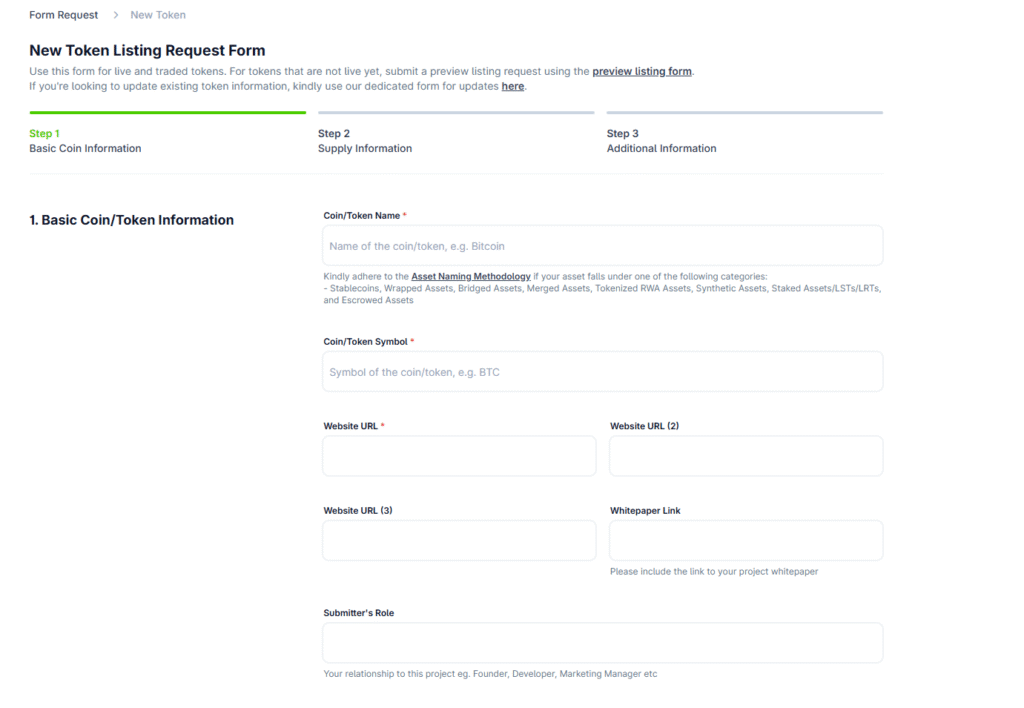
3.5 Step 5. Fill and Submit the CoinGecko Form
This is the most crucial step in the procedure. Your application form should be complete, correct, and substantiated by verifiable information. This is the division of the fields you will be required to fill in:
General Information
- Token Name (1.1): Give the official, full name for the token. It should be the same name used on block explorers.
- Symbol (1.2): Always use the symbol in caps (i.e., use BTC for Bitcoin). Consistency across all platforms is most crucial.
- Website URL (1.3): Provide the principal website where users can find official information about your token.
- Whitepaper Link (1.4): Link to your whitepaper detailing the tokenomics, use cases, and future roadmap.
- Submitter’s Role (1.5): Identify the role you play (e.g., founder, developer, marketing manager) so the reviewer can know who to follow up with.
Project Description
- What Is the Project About? (Field 2.1): Provide a concise and clear explanation of the purpose and use of your token.
- What Makes Your Project Unique? (Field 2.2): Highlight innovative elements, technology, or uses that differentiate your token.
- Background History of Your Project (Field 2.3): List the most notable milestones or achievements that define the development of your token.
- What’s Next for Your Project? (2.4): Outline future plans, future functionality, or growth plans.
- Token Utilization (Field 2.5): Specify the purpose for which the token will be employed in your ecosystem—payment, staking, governance, or otherwise.
Trading and Blockchain Details
- Exchange Trade URL (3.1): Provide the direct URL for the trading pair on which your token can be traded (e.g. Uniswap or Tokpie market).
- Explorer Links (4.1): Include links to blockchains like Etherscan or BscScan so that users can view the transactions and contract details for your token.
- Blockchain Platform (5.1): Specify the blockchain that the token is built upon (such as Ethereum, BNB Smart Chain, Polygon).
- Contract Address (5.2): Give the smart contract address for the token in the exact format it is displayed on the blockchain.
- Contract Decimal Places (5.3): Set the decimal places to be used by your token; this is required for correct price display.
Supply Information
- Top Holder List URL (6.1): Provide the URL for the top 10 wallet holder blockchain explorer page for the token.
- Distribution Schedule (6.2): Reference to the document outlining the distribution, vesting, or lock-up schedule for your token.
- Token Generation Date (7.1): Give the date when you first launched your token in the form mm/dd/yyyy.
- Maximum Supply Amount (7.2): Set the maximum total tokens that can ever be produced (or select the “infinite supply” if this is so).
- Total Supply Amount (8.1): Give the total supply, taking into account any tokens burned.
- Total Supply API (8.2): Implement an API endpoint to retrieve the latest total supply.
- Burned Wallet (8.3): Include any wallet addresses for tokens that have permanently been taken out of circulation.
- Circulating Supply Amount (9.1): Fill the tokens in the market.
- Circulating Supply API (9.2): Add an API URL to display real-time circulating supply.
- Locked/Vested Wallet Data: Offer details about tokens locked or vested and thus not available for trading.
Allocation and Further Supply Details
- Allocation Breakdown (10.1): Breakdown the distribution to the various stakeholders—private sale, public sale, team, advisors—with vesting schedules laid out.
- Supplementary Supply Data (11.1): Fill in this space with any extra information that can be used to help the CoinGecko team better understand the dynamics of the supply of your token.
Social Media and Community Relations
- Twitter Profile Link (12.1): Provide the URL to your official Twitter profile.
- Telegram Channel Link (12.2): Share the URL for your public Telegram channel.
- Facebook Profile Link (12.3): We only accept official Facebook Pages.
- YouTube Channel Link (12.4): Give the URL for the project’s YouTube channel.
- Subreddit Link (12.5): If you have it, share the URL for the subreddit for your project.
- Other Social Media Links (12.6): You can add at most three more links (like Instagram, LinkedIn).
- Discord Invite URL (12.7): Provide an active invite URL for your Discord server.
- Medium URL (12.8): Add the URL to your official Medium blog if you have one.
Project Categorization
- Category 1 (13.1) and Reason (13.2): Select the most suitable category (such as DeFi, NFT, gaming) and provide a comprehensive explanation (minimum 250 characters) for the same.
- Category 2 (13.3) and Reason (13.4): Secondary category, if any, and why it fits.
- Category 3 (13.5) and Reason (13.6): Optionally, select the third category and explain it in detail.
Developer Description
- GitHub, GitLab, and Bitbucket (14): Add links to the project’s source code repositories to show transparency and technical depth.
Visuals and Closing Comments
- Token Image (15): Add a transparent background logo in the form of WEBP, JPG, or PNG (preferably 200px x 200px with transparent background).
- Comment (16): Add any special requests or additional information that would be helpful to the CoinGecko review team.
- Verify & Submit (17): Next, accept the terms and conditions, complete the CAPTCHA, and click “Submit Request.”
It is necessary to go to the trouble to complete every field completely and correctly. A partially completed or inconsistent application can result in delay or outright refusal, so double-check all the details prior to submitting.
3.6 Step 6. Creation of Public Verification Posts
Once you’ve filed the application, the next step is to build the credibility for your token by making an official announcement. Here’s what you should do:
- Get Your Request ID: After filling in the form, visit the status page for your CoinGecko account to find your request ID.
- Public Announcement: Post to the official social media channels for the project—most importantly, Twitter—with your request ID and the URL for GeckoTerminal. For example:
«Just asked for listing for my project, [Your Project Name], on CoinGecko!»
Request ID: Your Request ID
GeckoTerminal Link: <link to your project’s GeckoTerminal page> - Additional Validation: For extra authenticity, you can include your Telegram @username. This public validation, along with marking transparency, also reduces the potential for fake contract addresses.
4. Accelerate Token Listing on CoinGecko with Fast Pass
The Fast Pass feature is offered by CoinGecko, which can restrict listing or update review time to 24 hours. It was introduced in September 2024 and is ideal if you need to speed up the token’s market entry.
4.1 How Do I Get a Fast Pass on CoinGecko?
Once you’ve completed the standard application, the «Purchase Fast Pass» button will be available on your status page. In order to buy the Fast Pass:
- Accept the Terms: Check the «Fast Pass Terms» checkbox.
- Press the Green Button: Immediately after you submit, press the green «Purchase Fast Pass» button.
This product is similar to priority support services offered by other trackers but at a reduced cost.
4.2 Payment for Fast Pass at CoinGecko
After clicking the purchase button:
- Enter Your Details: You will be prompted to enter details such as your country and address.
- Payment Process: Fill in your bank card details and click on «Pay.»
- Confirmation: Your order will be reviewed and prioritized within the first 24 hours after payment.
Keep in mind that the Fast Pass speeds things up but technically does not assure approval. It does, however, significantly reduce the wait time, advancing your token to market visibility more rapidly.
5. How to Check the Status of Your Application
Staying updated on your listing’s status is simple:
- Log In: Login to your CoinGecko account.
- Status Page: Visit the status page to see all the requests you’ve made.
- Updates: Look for any changes—whether it’s being reviewed, accepted, or rejected.
This constant accessibility allows for monitoring the progress and making arrangements for follow-up actions if required.
6. How Long Does It Take to List?
The review process for CoinGecko can be varied:
- Standard Review: It typically takes 2 to 20 business days to review.
- Review in 24 hours with Fast Pass: Your application will be reviewed in 24 hours when you use the Fast Pass.
The best method to expedite the review process is to provide complete and verifiable information upfront.
7. Reasons for Rejection and Solutions
Even if you apply correctly, your token can be rejected. You need to be familiar with the most common reasons for rejection and the methods to correct them.
7.1 Project Volume is Too Small
Issue: Daily trading volume falls below the required $50,000.
Solution: Increase the market presence for your token by listing it on other legitimate exchanges and enabling market-making or auto-trading programs.
7.2 Project’s Liquidity is Too Low
Issue: Insufficient liquidity (BIDs/ASKs) in the 2% spread.
Solution: Increase the pool size on decentralized exchanges or, if you are trading on a centralized exchange, alter liquidity parameters to achieve the pool size of $500-$1500 on both sides.
7.3 Insufficient Detection of Organic Attention
Issue: There is minimal social media presence for the token, with only several dozen followers.
Solution: Enlarge the community by engaging more, doing airdrops, or increasing social media presence. Remove inactive or low-following channels on the official website.
7.4 Not an Original Project
Issue: The project can be seen to be an imitation or replication of another available token.
Solution: Ensure the project is original. Do not plagiarize and declare the specific project characteristics in the application.
7.5 Project Contains an Unverified/Proxy Contract
Issue: Either the token smart contract is not verified on explorers like Etherscan or is listed as a proxy contract, which is a security issue.
Solution: Have the smart contract checked and, if possible, audited by reputable organizations. Add transparent documentation to address these issues.
7.6 Unable to Update Categories and Tags
Issue: Starting 2024, CoinGecko enforced stricter standards when updating the categories and tags for your token.
Solution: Provide evidence of the existence of an operational product prototype or physical work towards development so the CG group can accurately classify your token.
Tip: If the application is rejected, wait for two weeks and re-apply. Re-applying too soon can lead to the application being identified as spam and further delay.
8. What if I Still Cannot Obtain a Verification?
If repeated submissions fail to be verified even after all the errors have been corrected:
- Improve Your Website: Your project website should be professionally designed and never built on generic platforms like Wix or WordPress.
- Adjust Tokenomics: Decrease excessive taxation (if needed) to 3-5%.
- Token Re-creation: In some cases, re-creating your token and starting fresh with a new purpose is the only solution. Utilize an outsource solution that’s turn-key to make the quality and look of your project better.
9. How to Add More Markets
Your work does not stop with listing successfully. Your token will expand, and you’ll need to include new markets or exchanges:
- Log in to Your Account: Log into the CoinGecko account.
- Submit an Update Request: Go to the “Update Coin or Token Info” section.
- New Market Addition: Select the «New Listings on Exchange/New Market Addition» option. Include proper public links to the new market trading pairs (like, for example, Tokpie “BMC/ETH” with its direct URL).
- Submit and Wait: When you submit the update, it can take 24-72 hours for the new market to be displayed on the page for your token on CoinGecko. It’s extremely important to make sure the price for your token is the same on all the exchanges. Price differences can result in added complications to the update.
10. Update Circulating Supply: Market Cap and Rank
When the token is listed on many exchanges, the circulating supply must be accounted for to accurately calculate the market cap and rank:
- Multiple Listings: When listed on many exchanges, the aggregate information allows the calculation of the dynamic market cap by CoinGecko.
- Submit an Update: When you see many markets listed on the page for your token, submit an update request for the circulating supply.
- Consistency: Be sure the price for your token is the same across markets to prevent the update from being rejected.
This real-time updating process keeps the information for your token current, representing its real-world market performance.
Conclusion
Listing on CoinGecko is a multifaceted process that can have a big influence on the visibility, standing, and overall performance of your coin. This step-by-step guide has taken you through it all—from having the token live on real exchanges and optimizing your market stats, to filling the comprehensive CoinGecko form and even accelerating the process with the use of the Fast Pass feature.
Keep in mind that each step, from updating the information for your token on GeckoTerminal to having the same prices on different markets, is crucial to the success of an application. Don’t be discouraged if the initial listing attempt is rejected; use the feedback to improve trading volume, liquidity, and community interaction before reapplying after the correct cooldown. Aside from CoinGecko, having the token listed on other alternative trackers and using other types of advertising and utility will be an overall ecosystem for the cryptocurrency. For any other information or expert advice, don’t hesitate to reach out to professionals in the field. With proper planning, open communication, and steady market performance, the token can achieve the coveted listing on CoinGecko, opening new channels for growth, investor interaction, and sustainable achievement in the ever-changing landscape of cryptocurrency.


