


What’s the Livecoinwatch?
Livecoinwatch is a live price tracker for coins with live prices, charts, and crypto market cap for over 10703 coins listed for trading on 338 exchanges (including the Tokpie exchange). It also has useful features and reasonable Traffic, as explained below.
Also, adding blockchains like Ethereum protocol, TON network, Tron system, and Solana blockchain. Adding it to the BNB Smart Chain, Base platform, Polygon ecosystem, and Arbitrum network will broaden reach and adoption.
Features
Also, the API for the tracker returns more than eight years of price history, while other leading trackers return only two years of history for standard altcoins. Also, users can categorize crypto-assets by Trending Coins, Newest Cryptocurrencies, and Biggest Winners/Losers.
Traffic
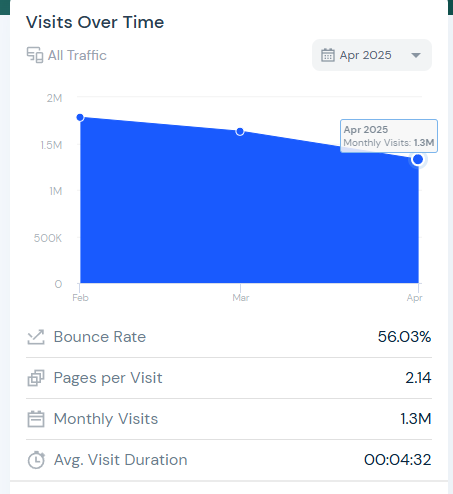
Besides, the tracker gets massive Traffic due to Alexa. It thus gets more than 1.5M visits every month, and it’s on the rise due to the similar web (below image). It gets 5 times less Traffic than Coingecko, but it makes sense to be listed on Livecoinwatch because it’s easy to be listed there. Also, survey the top coin tracking options.
Prioritize
Token Rank on Livecoinwatch is calculated by the market cap of the cryptocurrency. It is the volume-weighted average price multiplied by its circulating supply. It should be noted that the crypto-asset must be tradable on two exchanges with three markets to be able to achieve the rank.
How to add a token to Livecoinwatch
It only takes a couple of minutes to add a token to Livecoinwatch. But first, search in the search bar: it’s possible that your coin is already listed. If it is not, follow the instructions below.
1. Track exchanges
Make sure that your token is tradable and has volume on any one of these exchanges. If your coin is not yet tradable, simply list it on the Tokpie exchange. Listing on Tokpie also opens many other trackers for the project’s cryptocurrency: Coingecko, CMC, Coinpaprika, Coincodex, etc. Aside from that, listing token on exchange gives many more great advantages.
2. Open the request form
Scroll to the footer and click on the “Request a Coin” line to open the form.
3. Fill in the form
Then, fill in the following information and complete the appropriate fields on the form.
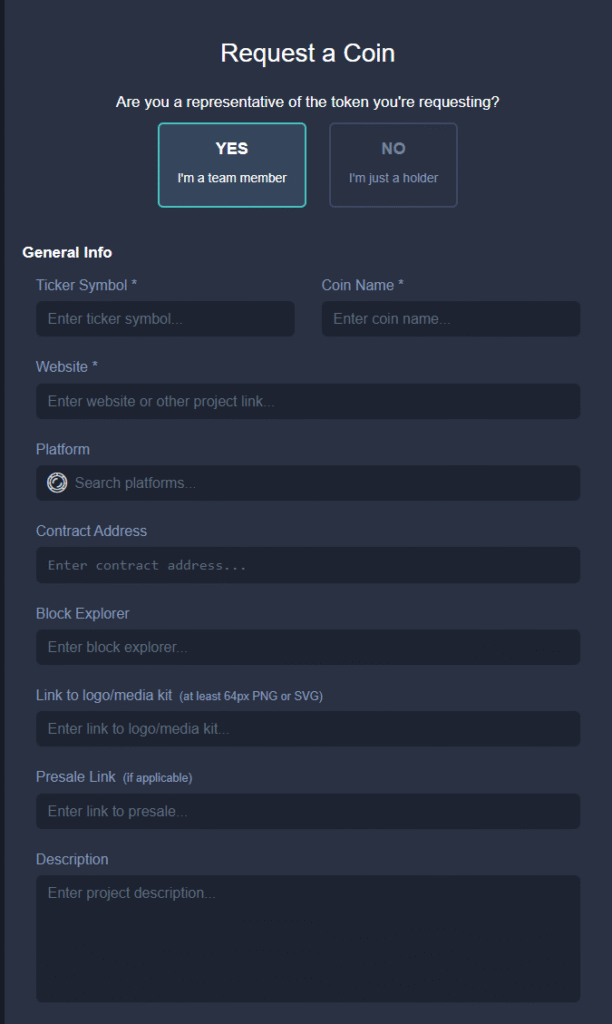
Filling form on Livecoinwatch
Livecoinwatch’s form to add a token.
- Email address: It is recommended to use an official domain email for the website of your crypto project.
- Token Name: Just copy-paste it directly from the page for your token on Etherscan (ERC20) or BSCscan (BEP20).
- Symbol: Your token’s short name, which is also displayed on Etherscan or BSCscan.
- Website: URL to the website of your crypto business.
- Exchanges: Names only of crypto exchanges, which exchange your token. There should be at least one exchange on which your coin is available for exchange. Do not include links to your markets.
- Supply API: You don’t need to complete this. But if you want to get a rank, include it.
- Supply the total API: This is unnecessary, but it is better to include such a link.
- Token Contract Address: Enter the field with the URL for the token contract address. It can be either the Etherscan or the BSCscan, or another scanner.
- Whitepaper: See the link to our project’s WP below.
- Telegram: Add the group chat URL for your business on telegram.
- Reddit: Worth mentioning that you must post in the subreddit URL here (not the URL for an individual’s profile).
- Twitter: Include the link to the official Twitter page for your project.
Once you’ve filled in all the required fields, click the Submit button. That’s it.


